


Profile Settings
After creating a profile based on your email address, you have access to all songs in the database. Of course, there is a possibility that you only want songs from a specific content type. I will now show you how to configure this.
Content Groups
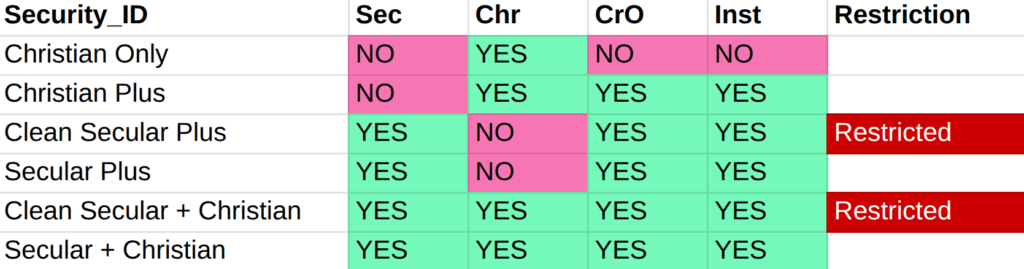
In the database, each song is assigned a content type. There are 4 of these groups: Christian, Crossover, Instrumental, and Secular. Content is also linked to Artists, but there can be multiple options for them (Carrie Underwood, for example).

Content Alert
Within the secular group, there are songs that use language that may not be suitable for some users. These songs are marked as “Restricted”.
Profile and Content
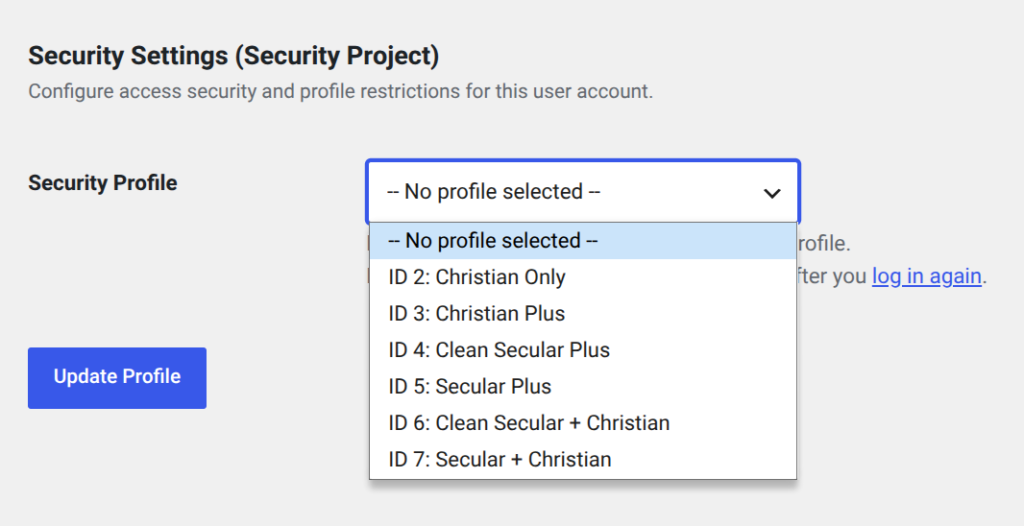
Within your profile, you can specify which content you want to see. Scroll down all the way to the bottom of the page. In the Security Settings you will see the definitions that are used.
If you want to have all songs, you choose “Secular + Christian”; if you only want Christian, you choose “Christian Only”.
Log Out First
After making a selection from the list, it is necessary to first log out and log back in. The new settings will then become active.